Slurm GPU scheduling, orchestration and execution: what each layer does
· Julia Slavin
Six GPUs are free. A job asking for four still waits. Before adding another platform, we’d want to know which constraint those free devices fail to meet.
Scheduling decides when and where a workload receives resources. Orchestration coordinates its environment and lifecycle. Execution is how the application computes on the allocation. These responsibilities overlap in real systems, but separating them helps explain why a job can receive GPUs and still struggle to produce a useful result.
For teams running Slurm HPC clusters or enterprise AI platforms, that distinction matters when deciding what to improve. Is the job waiting because of scheduling policy? Is its environment difficult to reproduce? Or does its execution strategy require a combination of GPUs that the available fleet cannot provide?
Each problem calls for a different intervention.
The three functions at a glance
Function | Main question | What to examine |
|---|---|---|
Scheduling | When and where can this job receive resources? | Resource requests, queue priority, availability and policy |
Orchestration | How is the workload deployed and managed? | Environments, dependencies, lifecycle and recovery |
Execution | How does the application compute on the allocated resources? | Software compatibility, memory, work distribution and communication |
This is a way to classify responsibilities, rather than divide products into exclusive categories. Slurm manages allocation, starts and monitors work, and handles pending jobs. Kubernetes manages containerized workloads and includes its own scheduler. [1][4][5]
The useful question is which responsibility is limiting the workload in your environment.
What Slurm GPU scheduling handles
In Slurm, GPUs can be configured as generic resources, or GRES. A job requests resources, and Slurm allocates them according to the request and the cluster configuration. Requests can identify a GPU type and count; the available options also depend on how Slurm is configured. [2]
A GPU request sits alongside the rest of the job's requirements. CPU resources, host memory, partition access and scheduling policy also affect whether the job can receive an allocation.
That allocation gives the job access to a defined set of resources. Slurm also provides the framework for launching and monitoring its processes. It does not follow that every available GPU is a suitable substitute for a requested one.
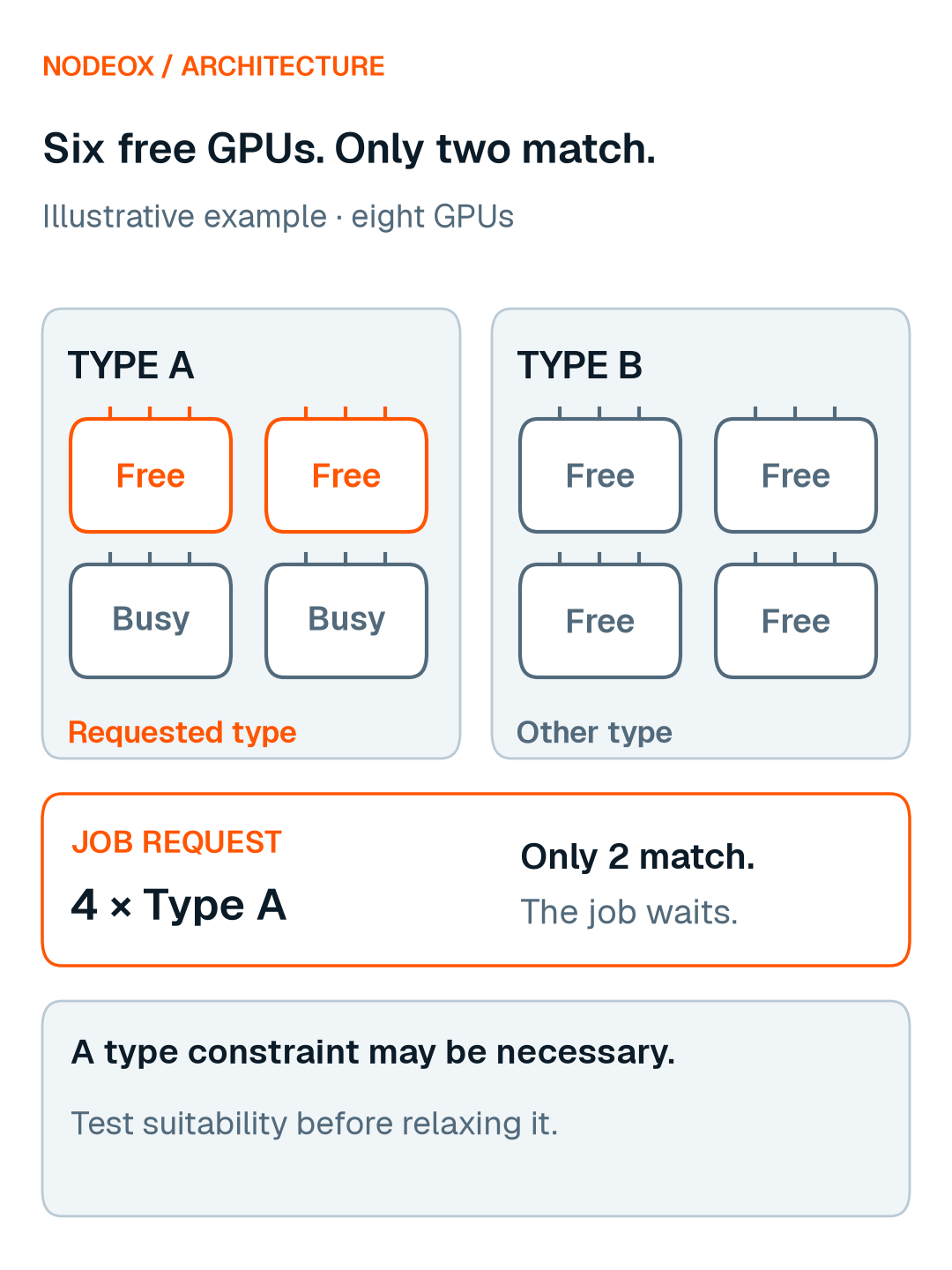
Consider an illustrative cluster with eight GPUs:
Four are of one configured GPU type; two of these are occupied.
Four are of another configured type; all four are free.
A pending job requests four GPUs of the first type.
Six GPUs are free, but only two match the requested type. The total inventory is larger than the capacity eligible under this request.
This does not establish that the request is unnecessarily restrictive. The requested type may reflect a real memory or software requirement. Before relaxing it, the team needs to establish whether the application can use the alternatives and produce an acceptable result.
Figure 1. Illustrative example: six GPUs are free, but only two match a request for four of Type A. The constraint may reflect a real workload requirement.
An idle-GPU count is a starting point for diagnosis. The next step is to inspect the specific job and its pending reason.
What GPU orchestration adds
An AI workload usually has a lifecycle beyond a single process. Its environment must be prepared, inputs made accessible, computation started, outputs collected and failures handled.
Orchestration addresses these operational concerns. Workflow tools can coordinate steps such as preparation, training and evaluation. Infrastructure platforms can manage deployment and application lifecycle. The exact responsibilities depend on the tools in the stack.
Kubernetes, for example, uses declarative configuration and controllers to manage containerized workloads. Its scheduler matches Pods to suitable nodes. A complete AI workflow may still require additional tools to coordinate application-specific dependencies and steps. [4][5]
A reproducible environment can solve a deployment problem. A workflow engine can solve a dependency problem. Neither change, by itself, demonstrates that a distributed training job will run effectively across GPUs with different capabilities.
Similarly, moving a workload to another cluster does not answer how its runtime will handle that cluster's hardware.
When evaluating an orchestration layer, start with the operational problem: what must be deployed, coordinated or recovered? Then separately examine the execution requirements of the application it launches.
What execution must handle
Once resources are allocated and processes are running, the application still needs a workable execution strategy.
For a distributed AI workload, this means answering questions such as:
Can the software run on each selected GPU?
Does the chosen parallelization strategy fit within the available memory?
How is work divided between devices?
What information must move between processes, and how often?
Can the run meet the required result quality and completion time?
Differences between GPUs become relevant at this level.
For example, PyTorch's DistributedDataParallel uses synchronization between processes. Its documentation explains that uneven processing speeds can leave faster processes waiting for slower ones, and that users are responsible for balancing workload distribution. [6]
That does not mean mixed GPUs are always unsuitable. It means a resource allocation cannot substitute for an execution strategy that handles the actual workload.
A fleet can contain enough devices in total while offering few combinations that meet a particular application's requirements. Conversely, some workloads may have more flexibility than their current resource requests suggest. Establishing that flexibility requires examination and testing.
Can Slurm run heterogeneous and multi-GPU jobs?
Yes. Slurm supports heterogeneous jobs made up of components with different resource requirements. It also supports launching applications across job components, subject to documented configuration and application limitations. [3]
This capability is important: heterogeneous execution should not be explained through a claim that Slurm cannot allocate different kinds of resources.
For Slurm multi-GPU jobs, distinguish two questions:
Can the workload manager allocate and launch the required resources?
Can the application use those resources together effectively?
The first concerns allocation and launch support. The second concerns the application, runtime, hardware and communication pattern.
A heterogeneous allocation may be useful for separate stages with different needs. Combining different GPUs within one training run raises further execution questions. Those situations should be assessed separately.
Diagnose the constraint before adding another layer
Before changing the stack, inspect one representative workload from submission to completion.
If it cannot start, examine scheduling. Check the requested resources, pending reason and relevant policy. Determine whether the constraint is necessary for the workload or is an assumption that can be tested.
If deployment is fragile, examine orchestration. Look at environment reproducibility, dependencies, data access and recovery. Identify which operational step is failing.
If it starts but progresses poorly, examine execution. Investigate memory pressure, work distribution, synchronization and communication. Check whether the allocated combination is appropriate for the application.
Several constraints can exist at once. The goal is to identify them clearly enough to choose an intervention and evaluate its effect.
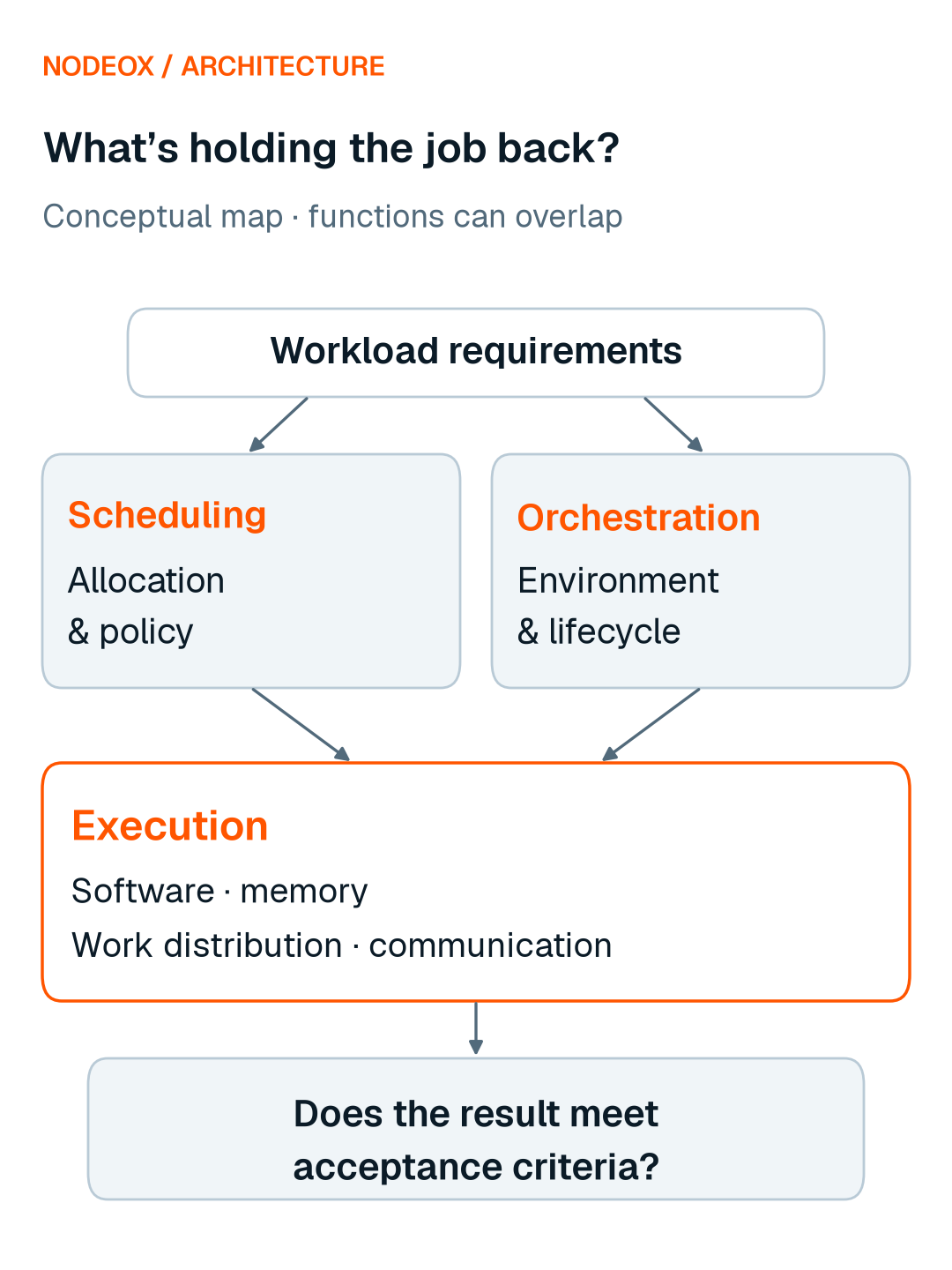
The figure below shows the responsibilities to examine. It is a conceptual view, not a deployment diagram or an integration claim.
Measure the result, not just the allocation
When testing a change, define success before the run.
Record the workload, baseline, hardware, network and acceptance criteria. Compare total time from submission to an acceptable result, as well as execution time and cost to complete. Track failures and retries where they affect the outcome.
A mixed GPU run could execute more slowly yet finish earlier if it waits less for resources. It could also lose that advantage through communication or coordination overhead. These are scenarios to measure, not outcomes to assume.
Higher GPU utilization can help diagnose behaviour, but it does not by itself establish that a workload finished sooner, cost less or reached the required quality.
Where Nodeox fits
Nodeox is building a scheduler-integrated heterogeneous execution layer for AI compute. Its aim is to make more fragmented GPU capacity usable by suitable workloads while working with the scheduler and infrastructure teams already use.
Instead of synchronizing every training step, each GPU host trains for a round sized to its speed, and the updates are combined between rounds.
Within that intended boundary, Slurm retains responsibility for queues and scheduling policy. Nodeox focuses on the execution question: can a suitable workload make productive use of resources that are not naturally interchangeable?
Our initial deployment focus is mixed GPU capacity inside one datacenter. Fine-tuning, post-training and evaluation are target workloads; each still needs its own compatibility, memory, communication and result-quality checks. Slurm integration is next; this article describes the intended boundary, not a shipped integration.
A useful starting point is one representative job, its current constraints and a baseline. That gives the team a concrete way to investigate whether broader hardware eligibility would improve the outcome.
Frequently asked questions
How do I request a GPU in Slurm?
Request GPUs with --gres=gpu::, or with --gpus, --gpus-per-node or --gpus-per-task, which require Slurm's select/cons_tres plugin. Follow your cluster's configuration and instructions. [2]
Is Kubernetes a replacement for Slurm?
That is an architecture decision, rather than a conclusion from the word “orchestration.” Both include scheduling responsibilities. Compare their fit for your workload and operational requirements before choosing or combining them. [1][4][5]
Does allocating more GPUs make a job finish faster?
An allocation alone cannot establish that. Measure the application's scaling behaviour, communication overhead and result quality on the proposed hardware.
Can any AI workload run across mixed GPUs?
Suitability must be evaluated. Hardware and software compatibility, memory, communication and quality requirements can limit which combinations are useful.
Start with one pending or slow job: its resource request, the actual blocking condition and the result it needs to produce. That is a much more useful conversation than the fleet’s idle-GPU percentage.